
HandyPaste vs Espanso
Espanso is a free, open-source text expander for Mac, Windows and Linux. You write your snippets in YAML files, and they expand as you type a trigger like :date. Developers love it for that.
HandyPaste is a native Mac app with a library window instead of config files, and a picker instead of triggers.
At a glance
| HandyPaste | Espanso | |
|---|---|---|
| Call up a snippet | ⌥⌘V, type a few letters, Return | Type a trigger; it expands as you type |
| Watches your typing | No. It acts only when you press its shortcut | Yes, to catch triggers |
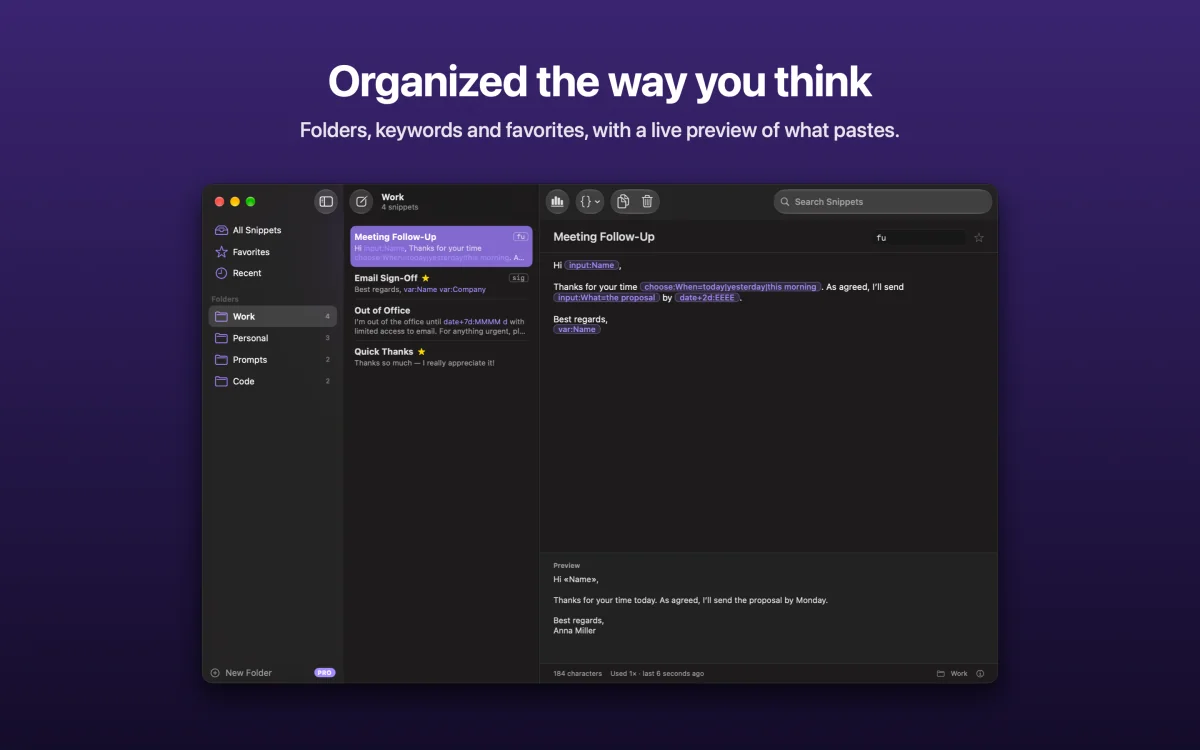
| Where snippets live | A library window with folders, search and a live preview | YAML files you edit |
| Dates, clipboard, cursor | Yes | Yes |
| Forms and choices | Yes, in one small window before pasting | Yes, with forms |
| Shell commands and scripts | — | Yes |
| Sync | Built in, through your own iCloud | Put the config folder in a synced folder yourself |
| Platforms | Mac; a free Chrome extension elsewhere | Mac, Windows, Linux |
| Price | Free; Pro is a one-time purchase | Free, open source (GPL-3.0) |
No config files
In HandyPaste, you create a snippet with ⌘N, give it a title, and type. Placeholders appear as chips in the editor, and {{ opens a menu of them, so there's no syntax to look up. Folders, keywords and favorites are drag and drop and a click. The library
Nothing watching your keyboard
To catch triggers, a text expander sees every key you press, and macOS has to allow it. HandyPaste uses a system shortcut instead and only acts when you press it. Privacy
A Mac app, all the way
HandyPaste is built with SwiftUI and AppKit and comes from the Mac App Store. It has a menu bar menu, Services, Shortcuts actions, VoiceOver labels and ten languages. It syncs through iCloud without any setup. With Pro, Claude and other MCP apps can use your snippets too. AI apps (MCP)
When Espanso is the better choice
- You use Windows or Linux as well and want one snippet setup everywhere.
- You like plain-text config you can keep in Git and edit in your editor.
- You want snippets that run shell commands or scripts.
- You want free and open source, full stop.
Get HandyPaste on the Mac App Store, or read Getting started.